Find any website's RSS feeds in seconds
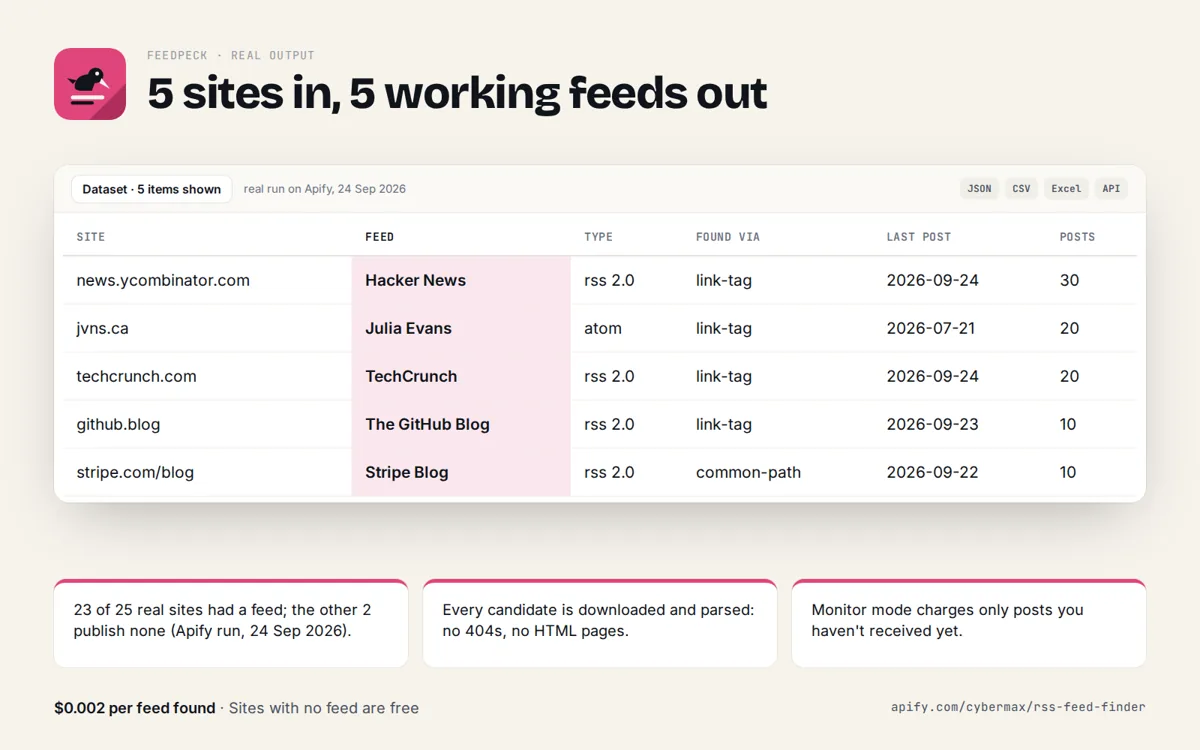
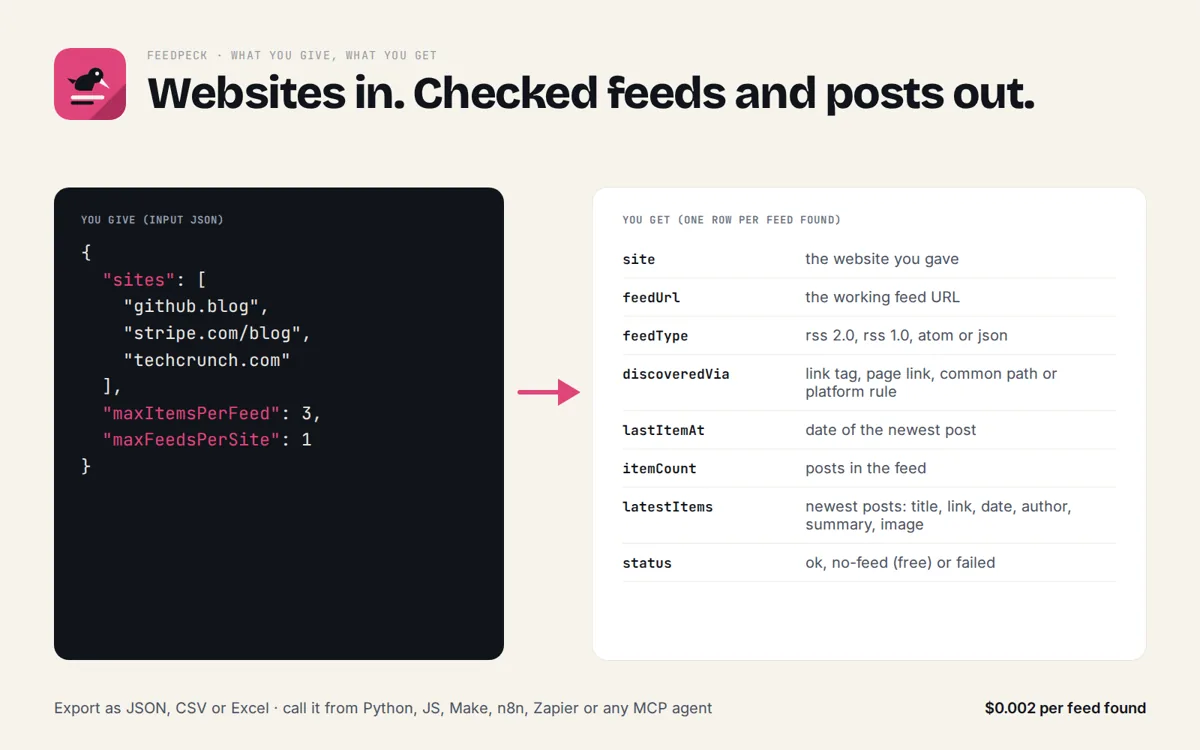
Type a website, get every real RSS, Atom and JSON feed it publishes, checked and parsed, with its newest posts. Works for blogs, news sites, Reddit, Medium, YouTube channels and GitHub releases.

Who it's for
Anyone who needs this answer fast, from a person to an AI agent.
Turn a pasted website into a subscribable feed URL without guessing /feed or /rss.xml.
Let an agent fetch the latest posts of any site as clean JSON: title, link, date, summary.
Check if competitors or sources publish a feed and how fresh it is.
One call replaces a feed-discovery library and an RSS/Atom/JSON parser.
Try it
Enter up to 5 websites. Feedpeck finds every feed they publish and shows the newest post of each.
Raw JSON response
Real sample output
Captured from a live call to this API (trimmed for length).
{
  "results": [
    {
      "site": "github.blog",
      "feedUrl": "https://github.blog/feed/",
      "feedTitle": "The GitHub Blog",
      "feedType": "rss 2.0",
      "siteUrl": "https://github.blog/",
      "discoveredVia": "link-tag",
      "lastItemAt": "2026-09-25T18:00:00.000Z",
      "itemCount": 10,
      "status": "ok",
      "description": "Updates, ideas, and inspiration from GitHub to help developers build and design software.",
      "language": "en-US",
      "firstItemAt": "2026-09-10T21:31:19.000Z",
      "latestItems": [
        {
          "title": "GitHub Copilot app for Beginners: How to build custom workflows with canvases",
          "url": "https://github.blog/ai-and-ml/github-copilot/github-copilot-app-for-beginners-how-to-build-custom-workflows-with-canvases/",
          "id": "https://github.blog/?p=99027",
          "published": "2026-09-25T18:00:00.000Z",
          "updated": null,
          "author": "Kayla Cinnamon",
          "summary": "Describe the interface you need in plain English, then let the agent build a live surface you can both use and update—so you spend less time adapting to tools and more time getting work done. The post GitHub Copilot app for Beginners: How to build custom workflows with canvases appeared first on Th…",
          "categories": [
            "AI & ML",
            "GitHub Copilot",
            "GitHub Copilot app",
            "GitHub Copilot app for Beginners"
          ],
          "image": null
        },
        {
          "title": "Improving site performance by shipping more CSS",
          "url": "https://github.blog/engineering/architecture-optimization/improving-site-performance-by-shipping-more-css/",
          "id": "https://github.blog/?p=99030",
          "published": "2026-09-25T15:00:00.000Z",
          "updated": null,
          "author": "Josh Black",
          "summary": "How we fully migrated github.com away from CSS-in-JS. The post Improving site performance by shipping more CSS appeared first on The GitHub Blog .",
          "categories": [
            "Architecture & optimization",
            "Engineering",
            "User experience",
            "automation",
            "CSS",
            "design systems",
            "performance engineering",
            "Primer",
            "scripting"
          ],
          "image": null
        }
      ],
      "fetchedAt": "2026-09-25T23:03:20.553Z"
    },
    {
      "site": "xkcd.com",
      "feedUrl": "https://xkcd.com/atom.xml",
      "feedTitle": "xkcd.com",
      "feedType": "atom",
      "siteUrl": "https://xkcd.com/",
      "discoveredVia": "link-tag",
      "lastItemAt": "2026-09-25T00:00:00.000Z",
      "itemCount": 4,
      "status": "ok",
      "description": null,
      "language": "en",
      "firstItemAt": "2026-09-18T00:00:00.000Z",
      "latestItems": [
        {
          "title": "Slab Graveyard",
          "url": "https://xkcd.com/3303/",
          "id": "https://xkcd.com/3303/",
          "published": null,
          "updated": "2026-09-25T00:00:00.000Z",
          "author": null,
          "summary": null,
          "categories": [],
          "image": null
        },
        {
          "title": "Voyager Instruments",
          "url": "https://xkcd.com/3302/",
          "id": "https://xkcd.com/3302/",
          "published": null,
          "updated": "2026-09-23T00:00:00.000Z",
          "author": null,
          "summary": null,
          "categories": [],
          "image": null
        }
      ],
      "fetchedAt": "2026-09-25T23:03:20.553Z"
    }
  ],
  "count": 3,
  "sitesChecked": 3
}
Limits, plainly
Free and rate limited so it stays fast for everyone. A bulk and scheduled version for big lists is coming to the Apify Store.
- 20 calls per minute per IP address.
- Up to 5 sites per call.
- Up to 10 latest posts per feed, up to 5 feeds per site.
- About 15 seconds per call at most; slow sites come back as "failed" with the reason.
- Free, no key, no sign-up. Feeds are fetched live on every call.
Use the API
JSON over HTTPS, CORS enabled, no key. GET for quick calls, POST a JSON body for lists. Spec: openapi.json · llms.txt
curl -s "https://feedpeck.cybermax-tools.workers.dev/api/feeds?site=github.blog%2C+xkcd.com%2C+reddit.com%2Fr%2Fprogramming&items=3"

# lists: POST a JSON body
curl -s -X POST https://feedpeck.cybermax-tools.workers.dev/api/feeds \
  -H "content-type: application/json" \
-d '{"sites":["github.blog","xkcd.com"],"items":3}'import requests
r = requests.post("https://feedpeck.cybermax-tools.workers.dev/api/feeds",
json={"sites":["github.blog","xkcd.com"],"items":3}, timeout=30)
r.raise_for_status()
for row in r.json()["results"]:
print(row)Endpoints: /api/feeds find and read the feeds of up to 5 websites
Add it to your AI agent (MCP)
A remote MCP server at https://feedpeck.cybermax-tools.workers.dev/mcp (streamable HTTP, no auth). Read-only tools with JSON schemas, so agents know exactly what to send.
// Claude Desktop, Cursor, VS Code, any MCP client (remote, no key)
{
  "mcpServers": {
    "feedpeck": { "type": "http", "url": "https://feedpeck.cybermax-tools.workers.dev/mcp" }
  }
}

# Claude Code
claude mcp add --transport http feedpeck https://feedpeck.cybermax-tools.workers.dev/mcp

# Tools: find_feeds, latest_posts
# e.g. find_feeds({"sites":["github.blog"],"max_items_per_feed":3})
find_feeds
Find the RSS, Atom and JSON feeds a website publishes (validated by downloading and parsing each one), with feed title, type, last post date, post count and the newest posts. Use when you need a feed URL for a site or want to know if a site has a feed. Up to 5 sites per call.latest_posts
Get the newest posts of one website from its main feed: title, URL, published date, author, plain-text summary (max 300 chars), categories and image. Use to catch up on a blog, news site, subreddit, YouTube channel or GitHub releases without scraping pages.
FAQ
Why not just try example.com/feed?
Many sites use other paths (/rss.xml, /atom.xml, /index.xml, /feeds/posts/default), hide feeds behind link tags, or return an HTML page with status 200 at /feed. Feedpeck downloads and parses every candidate, so you only get real feeds.
Which feed formats are supported?
RSS 2.0, RSS 0.9x, RSS 1.0 (RDF), Atom and JSON Feed, all returned in one schema.
Does it work for Reddit, Medium, YouTube and GitHub?
Yes. Pass reddit.com/r/<name>, medium.com/@<user>, youtube.com/channel/<id> or github.com/<owner>/<repo> and Feedpeck returns the matching feed.
What if a site has no feed?
You get one row with status "no-feed" and how many candidates were checked, so you know it was really looked for.
Can I check hundreds of sites or get alerts for new posts?
The free API is for up to 5 sites per call. A bulk and scheduled version with a new-posts-only monitor mode is coming to the Apify Store.
Is there a key or a cost?
No. The API and MCP server are free and rate limited (20 calls per minute per IP).